Romestead Roadmap: Act I, Updates, and What Players Can Verify
A source-first guide to the official Act I announcement, Steam News checks, Early Access uncertainty, and the difference between a roadmap promise and a released patch.
On this page
What does the Romestead roadmap confirm right now?
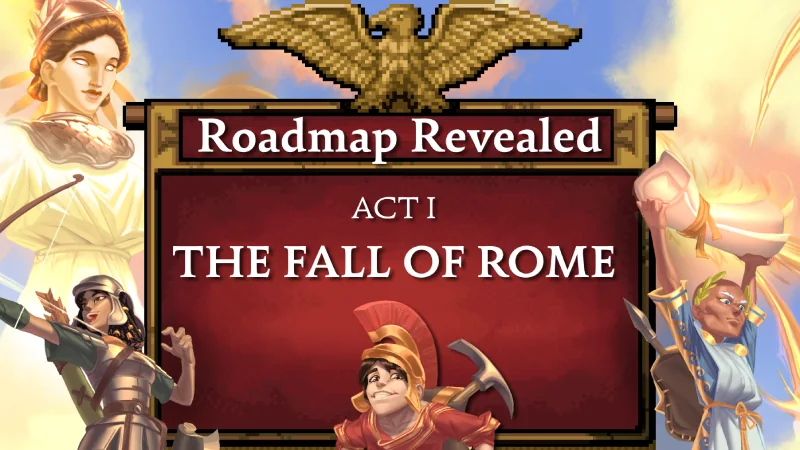
The useful answer to a Romestead roadmap search is narrower than many search snippets suggest. The official Steam News announcement presents a roadmap graphic with the heading Roadmap Revealed and names the first chapter Act I: The Fall of Rome. That confirms an official staged direction and gives the act a public identity. It does not, by itself, confirm a launch date for every feature, a fixed order for every patch, or a finished 1.0 schedule.
That distinction matters because Romestead is an Early Access game. A roadmap is a planning signal that can change when development priorities, technical constraints, testing results, or player feedback change. Treat the announcement as the strongest source for what the developers have chosen to communicate, but do not copy the image into a list of guaranteed mechanics unless a later official post explains them clearly.
For players, the roadmap is most useful as a filter. It tells you to look for new official posts and to re-check version-sensitive guides before making a long settlement plan. It is less useful as a reason to delay every decision. You can still use stable advice about storage, villager bottlenecks, defensive routes, exploration, and backups while marking exact values and feature availability as update-sensitive.
Confirmed layer
The developer has publicly named a first act and presented it through an official Steam News roadmap announcement.
Unconfirmed layer
A graphic alone does not prove exact feature order, a delivery date, a price change, a save reset, or a guaranteed mechanic.
Act I: The Fall of Rome — how to read the announcement
Act I: The Fall of Rome is an organizing label, not a replacement for patch notes. It gives the community a way to talk about the current development chapter and makes later posts easier to place in context. When a new Steam announcement appears, ask whether it describes a new milestone inside Act I, a hotfix, a balance adjustment, a technical change, or a separate community update.
The wording also fits the game's broader premise: building and defending a settlement while surviving pressure in a Roman setting. That theme is useful for understanding the direction of the game, but it should not be expanded into invented lore or a feature list. This page intentionally leaves out claims about unreleased buildings, bosses, gods, regions, or systems unless an official source describes them and the current build makes the claim testable.
If you are comparing the roadmap with a fan video or a community spreadsheet, keep three labels separate: announced, observed in the current build, and speculated. Announced means the developer has published it. Observed means players can verify it in the live public version. Speculated means it may be discussed or hoped for, but it is not a safe basis for a guide, a server migration, or a download claim.
| Evidence label | What it means | How a wiki should write it |
|---|---|---|
| Officially announced | The developer has published the statement or roadmap | Cite the post and avoid adding details it does not contain |
| Live in the build | Players can confirm the feature or value in the current version | Add the build date and explain how to verify it |
| Community report | Players are sharing observations or troubleshooting | Label it as community context and avoid calling it official |
| Speculation | A guess, wish, leak, or extrapolation | Do not use it as a current guide fact or download promise |
How to track Romestead updates without stale guides
The safest update routine starts with the official Steam News feed, not a search snippet or a reposted headline. Check the post date, read the developer's wording, and compare the announcement with the build that Steam is actually offering. A guide can remain useful after an update, but its exact costs, unlocks, boss behavior, mod compatibility, and server instructions may need a new verification pass.
Next, classify the change by player impact. A cosmetic announcement may not affect a settlement route. A balance patch can change resource priorities. A server or networking update can change hosting instructions. A save or progression change can affect whether a long-running world should be backed up before updating. Making this classification explicit is more useful than repeating every news headline inside every article.
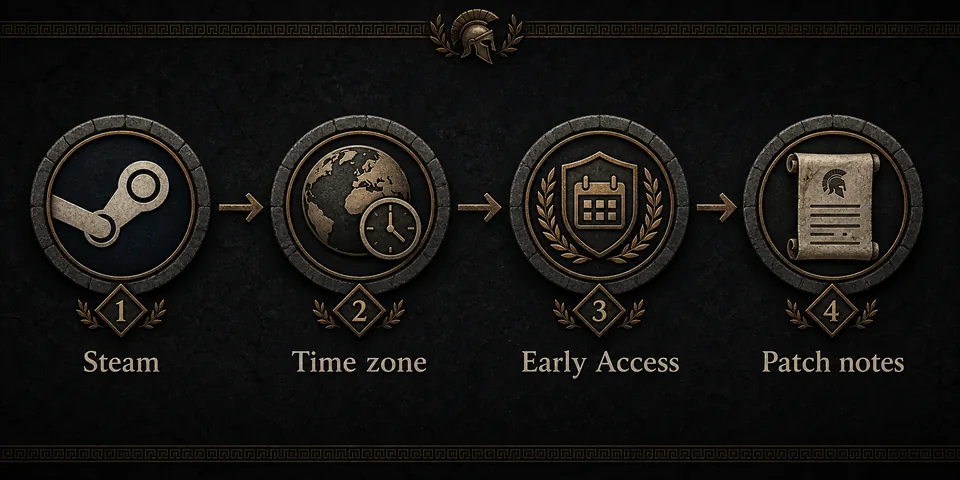
Use the four-step visual below as a quick habit: confirm the official Steam page, check your region and date, read the Early Access context, and then open the relevant patch or news post. If a page cannot answer which source and date it used, treat its exact numbers as provisional.
Before updating
Back up important saves, note the current build, and check whether server or mod files need a compatibility review.
After updating
Test a small, reversible action first. Record changed values instead of rewriting a full guide from one unverified report.
What should players do before the next Romestead update?
A roadmap does not require a special pre-update build. The best preparation is a reversible, well-documented settlement. Keep a modest reserve of essential resources, avoid moving every important structure at once, and make sure you know where the save and server backups live. This gives you room to compare a new build without confusing an update effect with a self-inflicted layout change.
For co-op groups, write down who owns the world, who manages backups, and who checks server or mod compatibility. One person should read the official announcement while another checks the live build and a third tests the shared save if the update looks significant. This is simple process, but it prevents a rumor or a partially applied patch from becoming a group-wide troubleshooting session.
The table is a practical boundary for this wiki. Stable planning belongs in evergreen guides. Exact values and release-state claims belong near a source, a date, and a version note. The roadmap page connects those layers without pretending that a future plan is already playable.
| Before a patch | Why it matters | Related Romestead guide |
|---|---|---|
| Back up saves and server files | Makes rollback or comparison possible | Dedicated server guide |
| Check mod and loader compatibility | Prevents an update from looking like a broken save | Mods guide |
| Keep a resource buffer | Gives the settlement recovery time after balance changes | Resources guide |
| Record the current build and date | Separates old advice from new observations | Release date guide |
| Use a small test session | Reduces the cost of an unexpected behavior change | Beginner guide |
Roadmap, patch notes, and this wiki's database roadmap are different
There are three roadmap-like phrases that can be mixed together in search. The game's official development roadmap describes a public development direction. Steam patch or news posts describe individual updates, hotfixes, and announcements. This site's database roadmap describes which wiki pages should be built next, such as resources, buildings, bosses, gods, co-op, and updates. They are related, but they are not the same document.
Keeping the boundaries separate prevents cannibalization and prevents readers from mistaking a content plan for a developer promise. The existing Romestead Wiki Guide remains the right page for choosing between site sections. The Release Date Guide is the right page for launch and Early Access wording. The Download Guide is the right page for official installation checks. This page is for the official roadmap and the workflow needed to keep those pages current.
When the next official post arrives, update this page only with claims supported by that post. If a change affects a specialized page, update that page's source, visible date, FAQ, screenshot caption, and version-sensitive wording separately. A single roadmap article should not become a thin copy of every guide or a feed of unsupported predictions.
Game roadmap
Developer-facing direction communicated through official posts such as the Act I announcement.
Patch notes
Version-specific changes that must be checked against the build, date, and affected system.
Wiki database roadmap
This site's editorial plan for future pages and verified data coverage.
A repeatable source check for Romestead update questions
When someone asks whether a Romestead update is coming, answer in layers. First say what the official post actually says. Then say whether the feature is visible in the current public build. Finally explain what players should do: wait, back up, test, update a mod, or use an existing guide. This structure keeps the answer useful even when the developer changes the plan later.
Avoid converting a search result's wording into a date. Search pages can show old snippets, translated titles, or community speculation. The official Steam News feed is the place to verify new announcements, while the store page is the place to confirm live availability and other current store facts. The wiki adds interpretation and practical routing, not a substitute for those sources.
This roadmap page will therefore be refreshed when an official source materially changes the public picture. The date at the top tells readers when the page was checked. If a later patch changes a specialized mechanic, the related guide should receive its own targeted update instead of relying on a generic roadmap paragraph.
Romestead roadmap reading checklist
| Question | Check first | Safe interpretation |
|---|---|---|
| Is this an official plan? | Steam News or a developer post | Use the exact wording and do not add missing dates |
| Is it playable now? | Current Steam build and in-game verification | Separate announced from live |
| Could it affect my save? | Patch notes, server notes, and backup status | Back up before a high-impact update |
| Does it affect mods? | Loader and mod compatibility notes | Test safely before loading a main world |
| Which guide needs an edit? | The system named in the update | Update the specialized page, not every page |
Romestead roadmap FAQ
Official sources and context
- Romestead Roadmap Revealed on Steam News - Official roadmap announcement with the Act I: The Fall of Rome graphic.
- Romestead Steam News feed - Use the live feed to check later announcements, patches, and developer context.
- Romestead official Steam store page - Verify current availability, build status, store information, and official community links.